

Every time a customer taps a card, scans a barcode, or receives a printed receipt at checkout, a Point of Sale (POS) system springs into action. For decades, the cash register was simply a locked drawer with a mechanical keypad to store currency. Today, modern POS systems have evolved into the central nervous system of everyday business operations—connecting sales transactions, live inventory counts, customer loyalty, and financial reporting in real time.
Collecting transaction data happens automatically at the checkout counter. But turning that constant stream of receipts, order volumes, and customer buying habits into smart business moves is what separates struggling shops from thriving enterprises. In this guide, we take a friendly, practical look at modern Point of Sale systems: how they work, the different types available, where they add the most value, and how Buyra helps businesses transform everyday checkout logs into predictive analytics, automated workflows, and high-impact growth strategies.
1. What is a Point of Sale (POS) System?
At its core, a Point of Sale (POS) system is the unified combination of hardware and software that businesses use to complete customer purchases. It represents the exact moment—and physical or digital location—where a customer exchanges payment for goods or services.
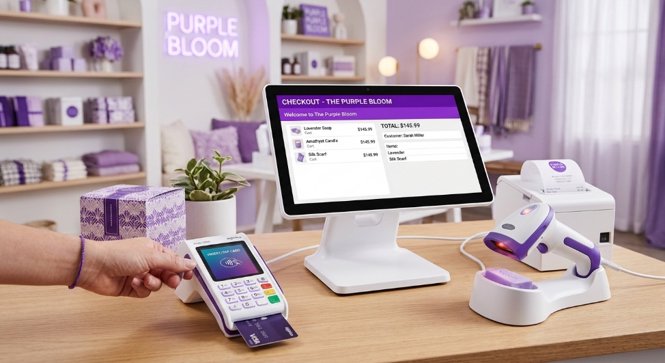
Modern POS setups go far beyond basic calculations and receipt printing. A complete system typically combines several hardware and software tools working in harmony:
- Touchscreen Displays & Tablets: Intuitive cashier interfaces that display product menus, scan items, and ring up sales in seconds.
- Barcode & QR Scanners: Handheld or built-in optical readers that instantly identify SKU numbers, retrieve product prices, and update stock counts.
- Payment Processing Terminals: Secure card readers that accept tap-to-pay, chip cards, magnetic swipes, and mobile digital wallets like Apple Pay and Google Pay.
- Receipt Printers: Fast thermal printers that generate paper receipts for customers, along with optional digital SMS or email receipts.
- Cash Drawers & Scales: Electronically triggered drawers that safely open during cash transactions, alongside integrated weight scales for grocery produce.
- Core POS Software: The central engine running behind the scenes that tracks sales figures, checks inventory thresholds, updates customer profiles, and keeps accounting records balanced.
Whenever a transaction is completed, the POS records vital data points: the items purchased, exact timestamps, itemized prices, applied discount codes, payment channels, and associated customer profiles. This transaction trail forms the backbone of modern business intelligence.
2. The 4 Main Types of POS Systems
Different businesses have different operational styles. A bustling quick-service cafe needs something fast and portable, while a multi-floor department store requires heavy-duty checkout lanes. Modern POS systems fall into four primary categories:
- Traditional On-Premise POS Systems: Installed on dedicated local computers and servers located physically inside your store. They run reliably even during local internet outages, making them popular with large supermarkets and high-volume retail chains.
- Cloud-Based POS Systems: Hosted on secure remote cloud servers and accessed through web browsers or desktop apps. They sync your sales, prices, and stock levels across multiple store branches in real time, letting owners check store performance from anywhere on any device.
- Mobile POS Systems (mPOS): Turn smartphones and compact handheld readers into portable cash registers. Perfect for food trucks, pop-up markets, curbside pickups, and roaming sales staff who can ring up customers anywhere on the sales floor.
- Tablet-Based POS Systems: Utilize iPads or Android tablets docked in sleek swivel stands as the main register. Highly popular in modern cafes, boutique retail stores, and salons for their compact footprint, clean aesthetic, and intuitive touch menus.
3. Key Features of Modern POS Systems
A great POS system does much more than calculate sales tax. It manages daily store operations so your team can focus on delighting customers. Key features include:
- Sales & Transaction Management: Scans items rapidly, applies seasonal promotional discounts, calculates split payments, and issues printed or digital receipts.
- Real-Time Inventory Tracking: Automatically deducts sold units from warehouse counts, warns you when stock is running low, and generates purchase reorders.
- Multi-Channel Payment Processing: Seamlessly handles cash, credit/debit cards, contactless NFC payments, gift cards, and popular digital wallets.
- Automated Sales Reporting: Provides instant snapshots of hourly revenue, average order values, top-performing product categories, and gross margins.
- Customer Relationship Management (CRM): Saves customer contact info, tracks purchase histories, and manages points-based loyalty reward programs.
- Staff & Permissions Management: Tracks cashier shift hours, monitors individual sales performance, and restricts managerial functions like cash drawer overrides.
- Product & Menu Organization: Allows store owners to categorize inventory by variants, sizes, colors, and modifiers with custom pricing tiers.
- Centralized Data Synchronization: Stores clean, timestamped transaction logs ready to connect with external accounting software and analytics dashboards.
4. Real-World Applications Across Industries
Because every commercial sector accepts payments, POS systems are customized to fit specific workflow requirements across diverse industries:
| Industry / Sector | Everyday POS Applications |
|---|---|
| Retail Stores & Boutiques | Scanning item barcodes, managing size and color variants, handling returns and exchanges, and processing customer gift cards. |
| Restaurants & Cafes | Routing kitchen orders to preparation display screens, managing table layouts, splitting guest checks, and processing tips. |
| Supermarkets & Grocers | Handling high-speed barcode scanning, weighing fresh produce at checkout, and tracking thousands of fast-moving grocery SKUs. |
| Hotels & Hospitality | Charging dining and spa services directly to guest room folios, managing check-ins, and handling foreign currency payments. |
| Healthcare & Pharmacies | Tracking prescription medications, verifying patient records, managing inventory expiration dates, and verifying insurance payments. |
| Beauty Salons & Spas | Scheduling service appointments, tracking commission payouts for stylists, and selling retail hair and skincare products. |
| Small Businesses & Pop-Ups | Accepting mobile payments on smartphones, maintaining basic digital receipts, and tracking daily cash flows without bulky hardware. |
5. Benefits and Practical Limitations
Adopting a modern POS system delivers immediate operational advantages, though growing businesses should also be aware of practical challenges before deployment.
Key Advantages
- Faster Checkout Speeds: Speeds up queues and eliminates long wait times by replacing slow manual tallying with one-tap scanning and payments.
- Accurate Stock Control: Gives owners 100% visibility over current stock counts, preventing embarrassing stockouts and costly over-ordering.
- Error-Free Record Keeping: Removes human math errors, incorrect cash register entries, and lost paper slips through automated digital logging.
- Immediate Performance Visibility: Lets managers check daily takings, best-sellers, and margin health at the click of a button.
- Better Customer Experience: Flexible payment choices, digital receipts, and personalized loyalty rewards keep buyers returning.
- Data-Backed Decision Making: Gives founders factual proof on what products actually sell, when stores are busiest, and where to invest budget.
Practical Considerations to Keep in Mind
- Hardware & Subscription Costs: Quality terminals, card readers, and cloud software licenses represent a real investment for small startups.
- Internet Reliability: Pure cloud systems need a stable internet connection or an automatic offline mode that syncs when connection returns.
- Data Security & Compliance: Systems handling cardholder data must strictly follow PCI-DSS payment security standards to guard against fraud.
- Occasional Hardware Glitches: Barcode scanners, thermal printer jams, or power outages require basic troubleshooting protocols.
- Staff Onboarding: New cashiers and seasonal retail employees need clear, friendly training to operate registers with confidence.
- Data Hygiene: Duplicate product entries or inaccurate initial stock counts will skew sales reports if datasets are not audited regularly.
6. Target Users and Everyday Roles
From frontline cashiers to executive directors, different members of an organization interact with POS systems for different operational goals:
| User Group | How They Use POS Data |
|---|---|
| Retail Business Owners | Monitoring store profits, planning product lines, managing supplier payments, and making hiring decisions. |
| Restaurant & Cafe Owners | Tracking daily food sales, managing table turn times, evaluating menu profitability, and reducing kitchen waste. |
| Supermarket Managers | Managing checkout lane speeds, scheduling cashier shifts, monitoring shelf restocking, and managing vendor deliveries. |
| Small Business Founders | Tracking daily cash takings, watching profit margins, and managing customer contact lists on modest budgets. |
| Hotel & Hospitality Directors | Reviewing guest spending patterns, auditing room charges, and managing multi-department revenue streams. |
| Cashiers & Sales Staff | Scanning purchases, issuing discounts, accepting payments, and greeting customers with fast, friendly checkout. |
| Business & Data Analysts | Extracting historical transaction logs to model buying behavior, predict demand surges, and optimize retail floor plans. |
7. Transforming POS Data into Business Analytics
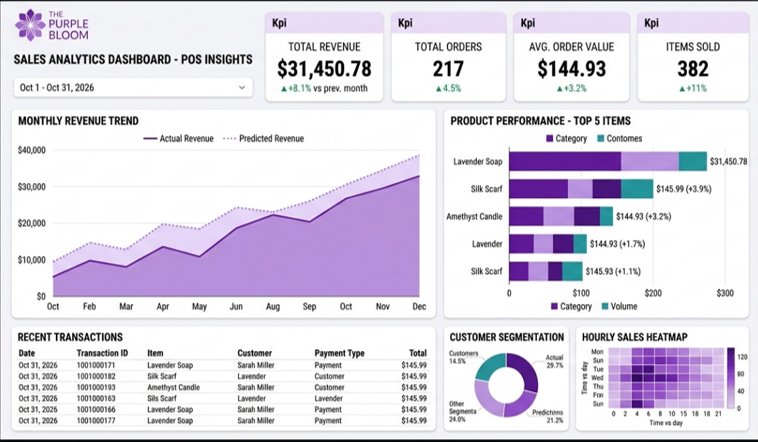
While cashiers see the POS as a register, data-driven leaders view it as a continuous goldmine of customer intelligence. Every single receipt contains clues that can optimize pricing, improve inventory turnover, and predict revenue.
Here are the key analytical disciplines unlocked by POS data:
- Sales Trend Analysis: Comparing daily, weekly, and monthly sales curves to identify seasonal peaks, slow trading days, and revenue growth.
- Product Performance & Margin Checks: Isolating high-margin best-sellers from dead stock that sits on shelves consuming valuable retail space.
- Customer Basket & Cohort Analysis: Revealing which items customers frequently buy together (market basket analysis) to design profitable bundle promotions.
- Inventory Velocity & Turn Rates: Tracking how quickly items leave stockrooms, highlighting the exact moment to reorder before running out.
- Predictive Demand Forecasting: Using historical seasonal sales data to accurately predict upcoming holiday demand and staffing requirements.
- Revenue & Discount Optimization: Measuring whether price cuts and promo codes actually generate more profit or merely cannibalize regular margins.
- Hourly Heatmap Monitoring: Identifying peak store rush hours to schedule cashiers and floor staff with maximum cost efficiency.
8. Types of Data Generated by POS Systems
Whenever a customer completes a checkout, the POS database logs a structured bundle of operational variables ready for reporting and predictive modeling:
| Data Category | Common Examples | Practical Analytical Use |
|---|---|---|
| Transaction Data | Transaction ID, date, time of sale, total amount, tax, currency | Tracking hourly sales curves and overall store revenue trends. |
| Product Data | SKU number, item name, brand, department category, unit cost, price | Evaluating product category profit margins and popularity. |
| Quantity Data | Number of units purchased, items per transaction, weight sold | Calculating average basket size and forecasting item restock needs. |
| Payment Data | Cash, credit card, debit, mobile NFC wallet, gift card, voucher | Negotiating card merchant fees and speeding up checkout flow. |
| Customer Data | Customer ID, phone number, loyalty tier, visit frequency, past purchases | Building personalized VIP perks and targeted marketing campaigns. |
| Inventory Data | Available stock, restock thresholds, wastage logs, warehouse location | Preventing stockouts and identifying supply chain bottlenecks. |
| Location Data | Branch ID, register number, store geographic district, online channel | Comparing store-by-store performance across different regions. |
9. How POS Systems Work with Other Business Tools
A POS system should never be an isolated island. When linked with modern engineering and analytical tools, checkout records become fuel for whole-company growth:
| Tool / Platform | Main Role in the Ecosystem | How It Connects with POS Data |
|---|---|---|
| POS Software | Day-to-day transaction recording & register flow | Generates the initial sales receipts, inventory counts, and customer purchase records. |
| Microsoft Excel | Quick manual calculations & spreadsheets | Allows store managers to inspect weekly sales exports and build basic pivot tables. |
| IBM SPSS Statistics | Formal statistical testing & hypothesis analysis | Tests whether customer demographic differences or pricing adjustments are statistically significant. |
| Python & R | Data engineering, automated pipelines & machine learning | Cleans messy transaction logs, builds automated data feeds, and trains demand forecast algorithms. |
| Microsoft Power BI | Interactive executive dashboards & visual reporting | Renders live revenue gauges, hourly sales heatmaps, and multi-branch comparison charts. |
| Cloud Databases (PostgreSQL/BigQuery) | Secure enterprise data warehousing | Safely archives millions of historical transaction rows for fast, reliable reporting. |
10. How Buyra Bridges POS Records with Modern Software Engineering
At Buyra, we believe checkout registers shouldn't just record the past—they should empower your future. While most POS software produces standard PDF receipts and simple tables, growing enterprises need connected databases, live executive dashboards, and automated alerts that drive real profit.
Here is how Buyra bridges the gap between raw checkout logs and executive decision-making:
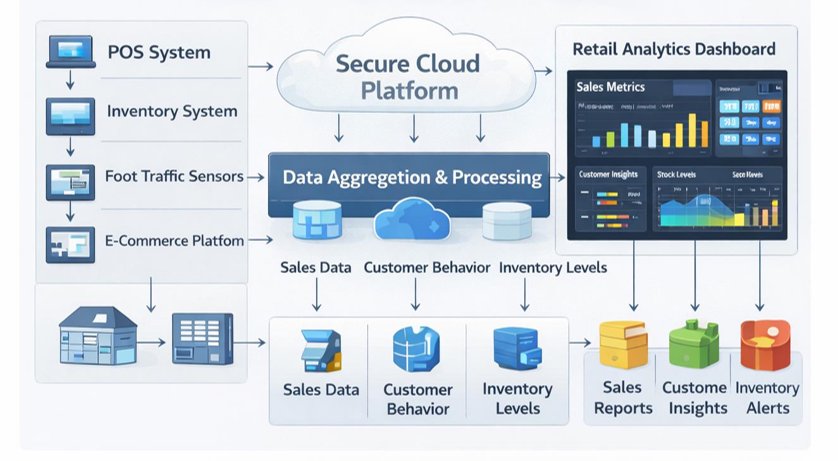
- Automated POS Data Pipelines: We build secure data connectors that extract, clean, and synchronize sales records from multiple registers and branches into one centralized cloud warehouse.
- Custom Power BI & Web Dashboards: We transform complex transaction databases into intuitive, live visual dashboards that track gross margins, hourly sales spikes, and top-earning categories.
- Predictive Demand & Inventory Forecasting: We implement machine learning models that analyze historical seasonal patterns, helping managers order the exact amount of stock and prevent stockouts.
- ERP, Accounting & E-Commerce Integration: We connect your physical POS terminal with your online Shopify store, QuickBooks/Xero accounting, and warehouse software so inventory balances everywhere in real time.
11. Potential Business Solutions Powered by POS Analytics
By combining retail hardware data with custom software development, Buyra builds practical technology solutions that eliminate common operational bottlenecks:
Centralized Multi-Branch POS Analytics Platform
A cloud-based web portal designed for businesses managing several retail locations or restaurant outlets from a single master view.
- Multi-Store Data Consolidation: Unifies separate branch POS feeds into one clean cloud database without manual spreadsheet exports.
- Comparative Performance Benchmarking: Compares branch-by-branch sales volumes, cashier speeds, and customer footfall side-by-side.
- Live Executive Overview: Provides company founders with instant visibility into total daily revenue across all locations on their mobile phone.
- Automated Discrepancy Alerts: Flags unusual till shortages, excessive refunds, or sudden sales dips immediately.
Intelligent Sales & Demand Forecasting System
A smart predictive engine that utilizes historical transaction records to forecast upcoming customer demand with mathematical accuracy.
- Seasonal Pattern Recognition: Discovers how weather, school holidays, and local festivals influence buyer purchasing trends.
- Automated Restock Recommendations: Tells warehouse managers exactly how many units of each SKU to order ahead of busy weekends.
- Waste Reduction for Fresh Food: Helps restaurants and supermarkets minimize perishable food waste by aligning kitchen prep with expected customer volumes.
- Staff Scheduling Optimization: Recommends optimal cashier shift rosters based on predicted peak rush hours.
Smart Inventory Monitoring & Restock Alerts
An intelligent inventory analytics platform that bridges registers with stockrooms to maintain healthy working capital.
- Fast vs. Slow-Moving Item Tracking: Automatically identifies products that sell quickly alongside dead inventory that ties up cash.
- Dynamic Reorder Point Calculations: Adjusts reorder thresholds based on current supplier delivery lead times and customer buying velocity.
- Instant Low-Stock Notifications: Sends automated WhatsApp or email alerts to purchasing leads when vital stock drops below safety limits.
- Barcode Batch Auditing: Simplifies physical stocktake counts by linking scanner inputs directly with cloud inventory ledgers.
Customer Purchasing Behavior & Basket Analytics
A customer intelligence tool that extracts deep behavioral insights from everyday checkout receipts.
- Market Basket Affinity Mapping: Identifies which complementary products are consistently purchased together in single receipts.
- Customer Lifetime Value Scoring: Segments casual shoppers from high-spending VIP brand advocates to guide promotional rewards.
- Promotional Impact Tracking: Evaluates whether discount codes attracted new loyal buyers or merely reduced margins on regular shoppers.
- Churn Risk Detection: Flags when previously regular repeat customers have not visited for several weeks.
Automated Business Performance Reporting
A hands-free reporting system that replaces tedious Monday spreadsheet compilation with automated executive briefings.
- Scheduled Management Briefings: Automatically delivers clean, visual PDF sales summaries to executive inboxes every morning or week.
- Cross-Department Revenue Reconciliation: Links POS revenue directly with bank deposits and merchant processor fees to catch accounting gaps.
- Custom KPI Dashboards: Builds personalized visual screens for store managers, marketing directors, and financial controllers.
- Role-Based Security Permissions: Ensures store staff only see register tools while executives access full company financial analytics.
12. Strategic Business Opportunities for Growing Companies
As digital transactions continue to replace cash worldwide, businesses that modernize their checkout infrastructure unlock major commercial advantages:
- Moving from Reactive to Predictive Operations: Shifting away from guessing what to order each week toward proactive, data-backed inventory planning.
- Unifying In-Store and Online Retail: Merging brick-and-mortar store registers with e-commerce websites into one unified omnichannel customer experience.
- Eliminating Costly Manual Data Entry: Freeing skilled managers from hours of copy-pasting numbers into spreadsheets every Monday morning.
- Building Long-Term Technology Partnerships: Collaborating with dedicated software engineering partners like Buyra to maintain, improve, and scale internal business tools as the company expands.
- Securing Higher Customer Retention: Rewarding repeat customers with seamless, personalized checkout experiences that build brand loyalty.
13. Conclusion: Turning Every Receipt into Long-Term Momentum
A Point of Sale system is far more than a tool for collecting cash or swiping cards—it is the beating heart of your daily business. While every transaction records a sale that just happened, the real power of modern POS technology lies in what it tells you about tomorrow.
At Buyra, that is exactly what we help you achieve. We combine modern software engineering, reliable cloud pipelines, and intuitive visual analytics to turn everyday checkout receipts into actionable business decisions—giving you the clarity, control, and confidence to grow your enterprise sustainably.